Every crash costs thousands. Bad setups burn time.
Why risk it?
Your CAM system can’t tell you what the machine will really do.
You need to know how your actual G-Code will behave – with your machine,
your fixtures, your tooling.
Eureka G-Code reads your NC file and shows exactly what’s going to happen. No surprises, no guessing, just verified results you can trust.
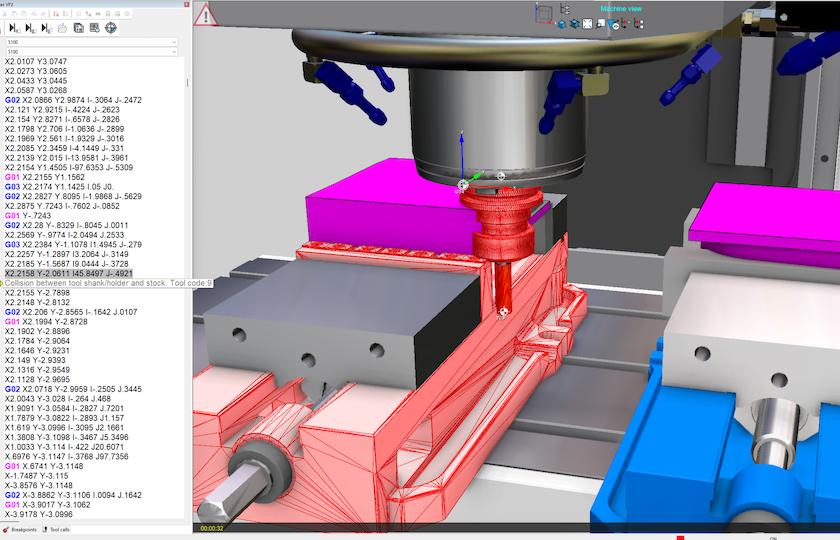
Eureka G-Code is a powerful simulation software that allows you to verify and optimize real G-code programs for CNC machines before actual machining. It reproduces the entire machining environment in 3D, including the machine tool, tools, fixtures, and the CNC controller.
By simulating the G-code exactly as it will be executed on the machine, Eureka helps prevent collisions, detect programming errors, and reduce setup times- ultimately increasing productivity and ensuring safe, high-quality results
What you get with Eureka G-Code
Real results. Real confidence. Real productivity.
Find the best set-up without taking the real machine out of production
The setup of machines and prove out of G-code programs can be a very long and costly process with a negative impact on production times, time-to-market and profitability.
With Eureka G-Code you can reduce machine setup time by up to 80%. In Eureka you can simulate and verify all ISO programs created either manually or post-processed from a CAM system.
Verify the ISO programs of the machine considering macros, subroutines and cycles
The majority of CAM programs simulations do not consider macros, subroutines and cycles. The CAM simulation doesn’t consider the “machine zero”, axis strokes, or the management of multi-heads and do not manage multi-heads, machines with more than 5-axes and also probing routines.
Eureka G-Code simulates the actual G-code regardless of how it was created, either manually, or post processed from a CAM Program. Eureka performs simulation based on a precise and reliable “digital twin” of the machine tool and CNC controller.
Interfaces for popular CAM and TMS systems
Transfer machining toolpath, tools, stock, design model, origins and fixtures
from your CAM system to Eureka with just the push of a button.
Import tools automatically from CAM or tool management systems.
Interfaces are available for the most popular CAM and TMS systems, including Mastercam, Creo, hyperMILL, Catia… and many others.
Automated Simulation with Eureka Cloud
Simulations Anyone, Anywhere Can Use with
Eureka Viewer
With Eureka Cloud, companies can implement a fully automated CNC simulation service. CAM operators simply generate the files through the interface and send them to the service. From there, Eureka Cloud handles everything:
• Smart Distribution, Simulations are automatically assigned to available networked PCs
• Optimized Scheduling, Jobs are queued and processed at the right time
• Full Traceability, Every simulation is logged in the company database for complete history and reporting
• Instant Notifications, Results are sent as soon as simulations are complete
• Private cloud: Eureka Cloud is a private cloud infrastructure integrated into the company network. Data always remains secure within the organization.
Eureka Cloud streamlines the entire process, reducing manual effort, improving efficiency, and ensuring reliable, documented simulation workflows across the organization.
With Eureka Viewer, companies can share completed simulation results across the organization without requiring a full Eureka programming seat. Operators, managers, customers, and support teams can review machine motion, setup sequence, and cutting behavior with a clear visual reference of how the real G-code will run.
• Free Access, Open and review saved Eureka simulations without consuming a full simulation license
• Better Communication, Give operators and production teams a visual reference before the program reaches the machine
• Setup Confidence, Review tool motion, machine movement, and cutting sequence in an easy-to-understand format
• Collision Visibility, See detected issues and simulation results clearly so teams understand what happened and where
• Digital Setup Sheet, Turn simulation into a practical shop floor reference for setup, review, and communication
• Anywhere Access: Simulation results can be reviewed on PC and mobile so the right people can see them wherever needed
Eureka Viewer helps extend the value of simulation beyond programming, improving communication, reducing uncertainty on the shop floor, and making simulation results available to everyone who needs them.
Eureka G-Code: features that matter
Simulate Accurately
Real G-Code Interpretation
CAM previews simplify. Eureka shows your actual post-processed code
Full Machine Kinematics
Avoid crashes with real axis and rotary behavior - not assumptions
Material Removal Simulation
Spot gouges and air cuts before they cost you tools or time
Full 3D Environment
Includes machine, tools, fixtures, and control logic
Prevent Errors
Automatic Collision Detection
Catch tool, holder, and spindle collisions before they happen
Joint Limits & Overtravel
Prevent unreachable positions in complex axis setups
Channel Sync Verification
Validate syncs in Mill-Turn & Swiss so channels don’t clash
Real Controller Logic
Eureka processes subs, macros, and loops like your CNC does
Boost Productivity
Setup Confidence
No more test runs or E-stop panic.
You know it runs right
Faster Debugging
Find and fix G-code errors instantly by jumping to any line
Visual Reports
Auto-generate run validations for QA or customer approval.
Easy CAM Integration
Use your CAM, post as usual, load into Eureka - done
What customer say about
“Eureka software has allowed us to go straight to production on new parts without having to tie up the machine proving out our programs. This would usually take a few hours per part. This has been very beneficial as we are moving 100’s of parts”
“Eureka has allowed Solvus to accelerate the implementation of advanced robotic motion for its additive manufacturing processes. Being able to resolve multi axis, coordinated motion through OLP simulation has enabled the Solvus team to significantly reduce deployment time and manufacturing risk. Additionally, having a true digital twin provided other optimizations in cycle times, minimized tool motion, and maximized working envelope.”
“ORNL is committed to working with industry to advance the state of the art in advanced manufacturing. This type of collaborative effort to develop integrated toolpath, process, and trajectory planning is essential for rapid testing of advanced manufacturing techniques.”
Aerospace, Automotive, and Beyond


The Eureka Virtual Machining
complete solutions
Reduce machine setup time, avoid crashes and optimize cycle time by simulating your G-code programs
Program and simulate Swiss type and multi-channel mill-turn machines using your CAM
Reduce machining time and extend tool life up to more 2X or more by optimizing the G-code programs generated by your CAM
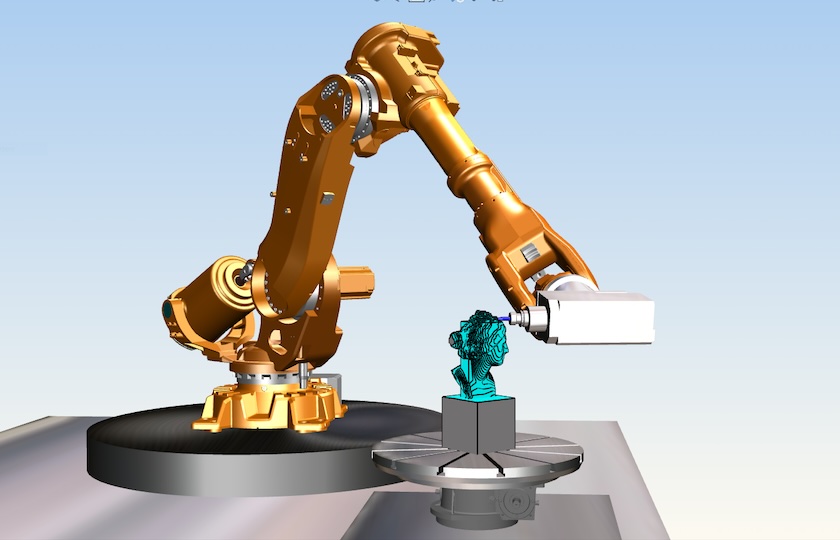
Simulate, verify, and optimize industrial robot paths for welding, deburring, trimming, and more.